Your choice of hosting can either raise or lower the performance of your website. In 2025, website owners have a lot more to consider, with concerns not just for prices but also speed, scalability, and WordPress optimization.
This guide breaks down the basic differences between Shared Hosting vs WordPress Hosting so that you may comprehend how each operates. Despite the similarities, we will also discuss what sets them apart, providing advice on which one best fits your website plans.
Whether you run a beginner website, manage an online store, or plan for a WordPress blog, you will learn below how best to choose the hosting solutions that meet your needs without skimping on quality and performance.
Why This Hosting Comparison Matters in 2025?
Technology for websites has changed. With faster frameworks, automated backups, and WordPress-optimized servers, hosting is now less of a concern about storage space and more about website performance and user experience.
For beginners, shared hosting is still the best choice. However, as they grow bigger, they switch to WordPress hosting for increased security and glitch-free operation.
By the time you finish reading this comparison, you’ll understand:
What shared hosting really is, including its limitations
What makes WordPress hosting different from shared hosting
The detailed comparison between shared and WordPress hosting
How to choose the optimal package for your site in 2025, and more!
What is Shared Hosting?
Shared hosting could be the type of hosting you buy when starting your first website or blog. But what does it mean in fact exactly, and why has this solution been famed for those who are new to website building?
Shared Hosting Explained
Shared hosting is the most popular and affordable type of web hosting around. It ’s called “shared” because more than one website is hosted on one computer server, with each resident sharing resources such as CPU power, RAM, and bandwidth.
Imagine it: you ’re renting a room in a huge block of flats. You have your own space (your website), but share electricity, water and internet traffic with everyone else stuffing around here and there for web surfing.
Hosting providers can afford to keep their prices low for this reason since they offer the service widely. In general, therefore, shared hosting might best suit new bloggers, small business owners and portfolio websites.
How Does Shared Hosting Work?
When you purchase a shared hosting plan, your website files, images and databases will be stored on the server belonging to your hosting provider.
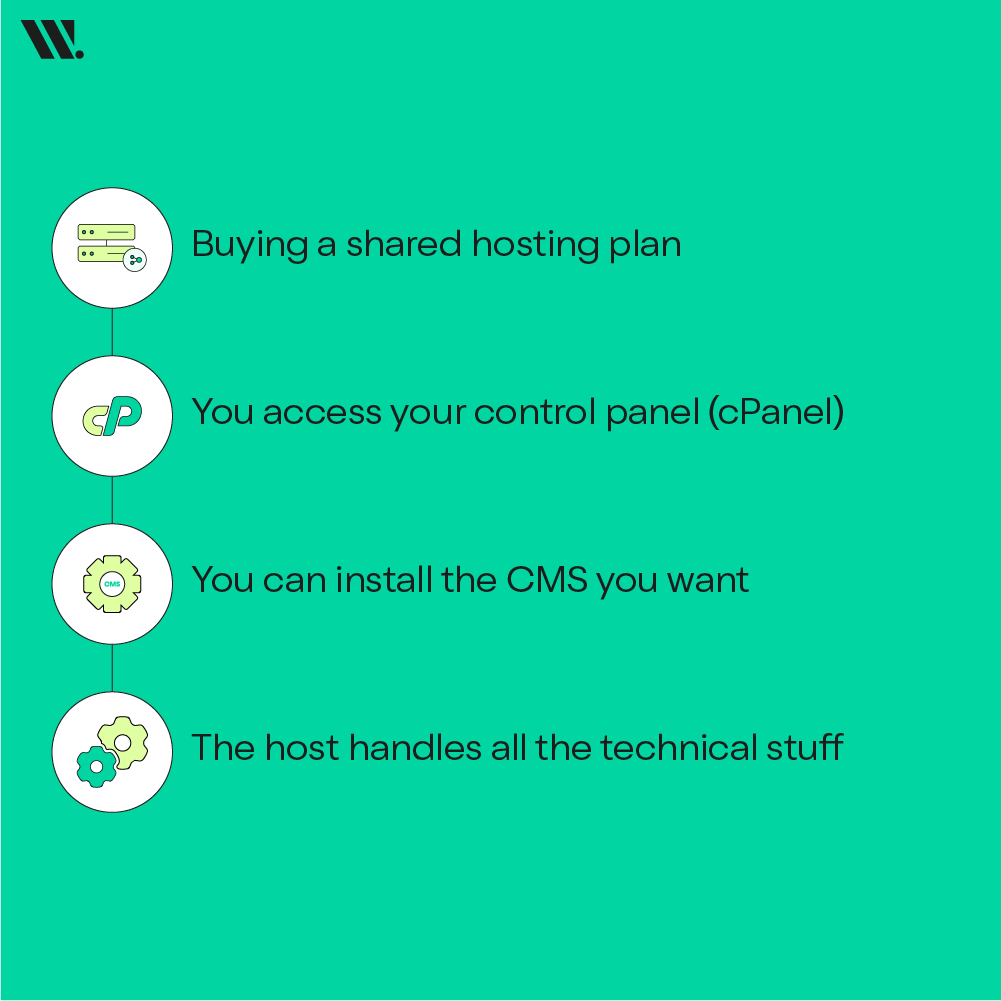
A typical workflow goes this way:
Buying a shared hosting plan (monthly or annually).
You access your control panel (cPanel). This is a dashboard for handling files, emails, and domains.
You can install the CMS you want (like WordPress, Joomla, or Drupal) typically by means of a one-click installer.
The host handles all the technical stuff, such as server maintenance, security patches, and monitoring uptime for you.
Most shared hosting for beginners includes simple features such as:
Domain registration and DNS management
Email accounts
File Manager and FTP access
MySQL database setup
Load balancing over high-speed secure servers
Automatic backups and SSL certificates
Who Is Shared Hosting Best For?
Shared hosting is suitable for
Small websites that do not attract much traffic
Personal blogs, small business websites, and portfolio sites
Startups looking to test something new before moving into bigger things
Students or freelancers trying to learn to make websites
If your website receives fewer than 5,000 visitors a month, then a shared hosting package is likely to serve you well at a minimal cost.
Advantages of Shared Hosting
Benefit | Description |
|---|---|
Cost-Effective | Shared hosting is the most budget-friendly option, with plans starting as low as a few dollars per month. |
Beginner-Friendly | Simplified setup with cPanel, one-click installations, and auto-updates for CMS like WordPress. |
Low Maintenance | The hosting provider handles server management, security patches, and maintenance tasks. |
Scalable Upgrades | You can later upgrade to VPS, cloud, or WordPress hosting as your site grows. |
Understanding Shared Hosting Limitations
While shared hosting is great for starting out, it does have some drawbacks that may affect website performance as your site grows.
Limitation | Impact |
|---|---|
Limited Resources | Since resources are shared, spikes in another site’s traffic can slow yours down. |
Performance Bottlenecks | Shared CPU and memory mean you may experience slower load times under high traffic. |
Security Risks | One compromised website on the server can sometimes impact others. |
According to these shared hosting limitations, it is not suitable for resource-heavy websites like online stores and high-traffic blogs. It is also not suitable for sites that rely on real-time data.
Real Example
Businesses know that Websouls can meet the hosting needs of local Pakistanis. For example, a person may want to run their personal blog on Websouls Shared Hosting or a small local bakery website. With just these most basic usage cases, we know it works well enough and runs smoothly and quickly!
Note, though, that if this same bakery added an online ordering system, then WordPress would be the obvious choice.
What Is WordPress Hosting?
If you're setting up an internet site with WordPress, you may come across hosting plans denoted by the name "WordPress Hosting". However, what it is, and how does this differ from traditional shared server web hosting?
Understanding WordPress Hosting
WordPress hosting means that the web hosting provided is specifically optimized for websites powered by the WordPress platform.
Instead of standard shared hosting, WordPress hosting makes use of servers optimized for WordPress. It provides faster loading times, even more secure websites, and improved performance on your WordPress site.
How WordPress Hosting Works
When you’re on a WordPress hosting plan, your provider configures your server environment to best suit WordPress CMS. This involves specialist caching, automatic updating and plugins or security layers that are added in from the get-go.
Here is what is typical:
You choose a WordPress hosting plan (basic or managed).
You use a one-click WordPress installer or find WordPress pre-installed.
The system automatically updates itself, optimizing data and cache management.
The server's infrastructure guarantees the highest level of compatibility with all WordPress core files, plugins and themes.
Types of WordPress Hosting
There are generally two types of WordPress hosting options available in 2025:
Type | Description | Best For |
|---|---|---|
Basic WordPress Hosting | A shared environment optimized for WordPress with better caching and support. | Beginners or small blogs |
Managed WordPress Hosting | Fully optimized and maintained by experts with automated updates, enhanced security, and performance tuning. | Businesses, agencies, and growing websites |
Both types are good WordPress optimized servers, but the managed version offers higher reliability, faster speeds, and hands-free maintenance.
Core Features of WordPress Hosting
Feature | Description |
|---|---|
One-Click WordPress Installer | Installs WordPress CMS in seconds without technical steps. |
Automatic Updates | Keeps WordPress core, plugins, and themes updated automatically. |
Server-Level Caching | Improves website performance by reducing load times. |
Pre-Configured Security Tools | Includes malware scanning, SSL, firewalls, and WordPress hosting security features. |
Daily Backups | Protects your data with automatic, restorable backups. |
Staging Environment | Lets you test changes before going live — ideal for developers and designers. |
These built-in optimizations make WordPress hosting ideal for users who rely heavily on WordPress functionalities, plugins, and dynamic themes.
Who Should Choose WordPress Hosting?
WordPress hosting might suit you if:
You plan to build your site using WordPress CMS.
You manage traditional plugins & themes.
Using WooCommerce in an online shop
Enjoy automated management (backups, updates, seo tools).
Shared Hosting vs WordPress Hosting in 2025: A Detailed Comparison
Shared Hosting vs WordPress Hosting is one of the most debated topics for site owners. The two have edged further apart in 2025, with hosting providers including AI-powered monitoring, even SSD-based servers and WordPress-tuned dedicated servers.
To make your decision for the best service, here is a full comparison according to performance, management, scalability and costs and more.
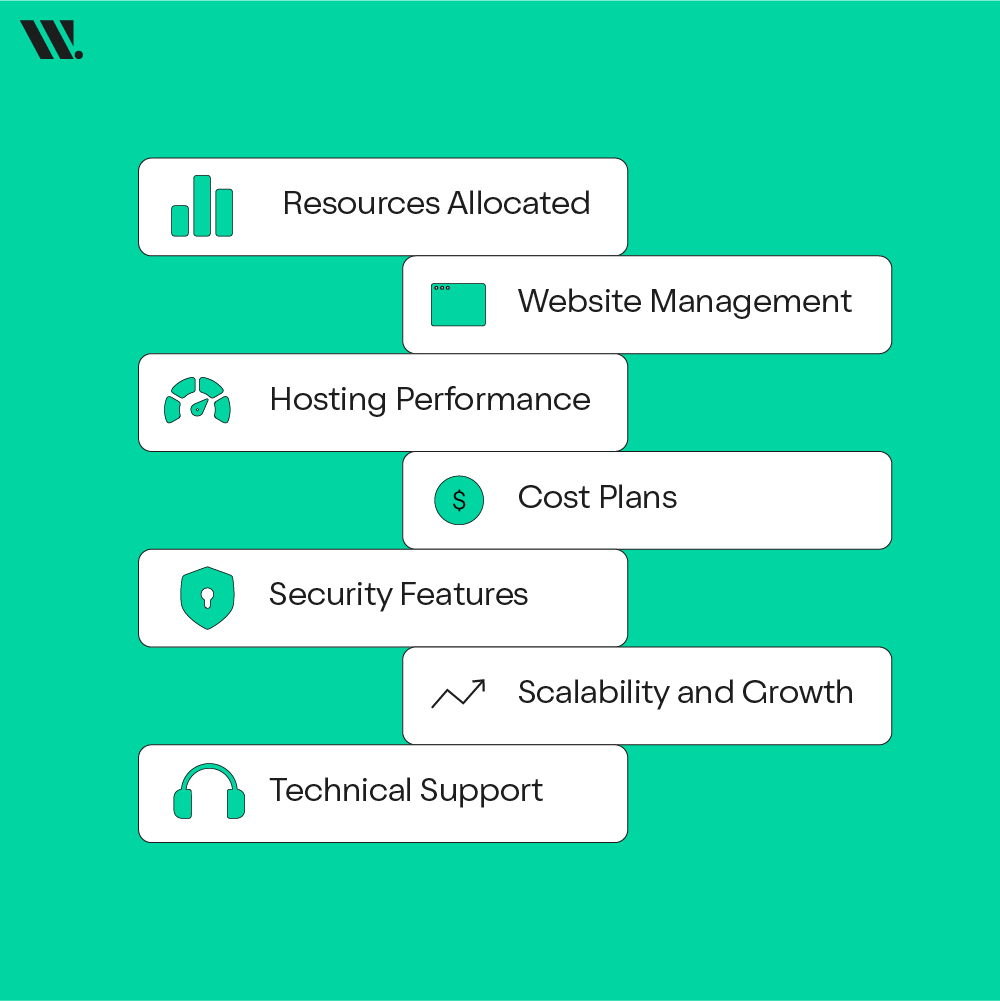
Resources Allocated
Shared Hosting
A big pool of resources is shared among all the sites, such as CPU, RAM, bandwidth and disk space. Other sites on your server get traffic spikes too, as one becomes busy and they can be slowed down. This is one of the biggest cons of shared web hosting.
WordPress Hosting
It saves resources and it’s more streamlined for use with the WordPress content management system. Most hosting environments use servers optimized for WordPress, with memory allocations made specifically for your website and caching. The other advantage is a more stable performance during congestion times.
Feature | Shared Hosting | WordPress Hosting |
|---|---|---|
Resource Management | Shared among hundreds of websites | Allocated specifically for WordPress sites |
Performance Impact | Can slow down if other sites consume more power | Stable and optimized for WordPress workloads |
Ideal For | Basic websites or portfolios | Blogs, eCommerce, and content-heavy sites |
Hosting Performance
Performance is where shared and WordPress hosting differ the most.
Shared Hosting
Performance vastly depends on server loading and configuration. It’s good enough for low-traffic sites, but starts to break down when you throw in a few plugins, a heavy theme or anything dynamic.
WordPress Hosting
When we talk about hosting performance for wordpress, it provides faster websites by caching, CDN integration, and latest Web Technologies. These Wordpress optimized servers are designed specifically to optimize the use of WordPress plugins and themes.
Example:
A site powered by WordPress on hosting that’s been optimized can load as much as 2x faster than when it’s on shared hosting, which further enhances SEO and the user experience.
Security Features
Security in what matters is most important for 2025.
Shared Hosting:
Includes simple firewalls and SSL certificates. But because several sites are in the same environment, if one gets hacked, it could affect others.
WordPress Hosting:
Comes with WordPress hosting security: malware protection, daily backups, DDoS protection and firewall for WordPress only. Some providers even automatically patch bugs from the moment updates are pushed out.
So, if you value peace of mind and automatic protection, WordPress hosting clearly wins this round.
Website Management
Shared Hosting:
You have cPanel to manage your site, but you're left to handle updates, backups and security on your end. It provides a certain amount of flexibility, but involves some technical callings.
WordPress Hosting:
Autopilots everything, from installation to updates with one-click WordPress installers and automated maintenance. Managed WordPress plans also give you round-the-clock support from WordPress experts.
Insight: WordPress hosting simplifies technical management, allowing you to focus solely on content creation and growth.
Cost Plans
Shared Hosting:
Shared hosting is only so named because several websites share the space on a single server. A few hundred rupees a month plans. The best solution for beginner websites.
WordPress Hosting:
Costs a bit more because it adds high-end performance and management features. It’s the trade-off between time saved on maintenance and a faster website.
Plan Type | Shared Hosting | WordPress Hosting |
|---|---|---|
Starting Price (Monthly) | Lowest-tier pricing | Slightly higher |
Included Features | Basic setup tools | WordPress optimization & support |
Hidden Costs | May require paid plugins for caching or security | Fewer add-ons needed |
Value for Money | Great for beginners | Best for growing websites |
Hence, choose shared hosting if your focus is on cost; choose WordPress hosting if your focus is on performance and uptime stability.
Scalability and Growth
Shared Hosting:
Scalability is limited. After your traffic exceeds what the server resources can handle, you’ll make a jump to VPS or cloud hosting.
WordPress Hosting:
Grow with your website automatically. Nearly all providers support on-the-fly traffic bursts, growing content, and CDN integrations without a service interruption.
Technical Support
Shared Hosting:
Provides help with server or cPanel-related issues. Not all support staff are familiar with WordPress.
WordPress Hosting:
The support is usually provided by WordPress-trained professionals who can diagnose theme incompatibility, plugin issues or just a drop in the CMS's performance right away.
Support Aspect | Shared Hosting | WordPress Hosting |
|---|---|---|
Availability | 24/7 | 24/7 |
Expertise | General hosting support | WordPress CMS experts |
Response Time | Moderate | Faster priority support |
Advanced Guidance | Limited | Plugin and theme troubleshooting |
Overall Comparison Summary
Feature Category | Shared Hosting | WordPress Hosting |
|---|---|---|
Performance | Standard | Superior with caching and CDN |
Security | Basic | WordPress-specific protection |
Ease of Use | Beginner-friendly | Automated and optimized |
Management Tools | Manual | Managed tools included |
Pricing | Budget-friendly | Slightly higher but feature-rich |
Support | General | Specialized WordPress support |
Scalability | Limited | Easily scalable |
Best For | Beginners, small sites | Blogs, businesses, eCommerce |
By 2025, the only true difference between shared and WordPress hosting is optimization and ease of use. Shared hosting is still great for small, static websites; there aren’t any big fireworks here. But if you are hosting a WordPress CMS CMS-based site, you do need speed, security and reliability to top everything else. Then go for WordPress hosting from Websouls. They provide the best hosting for WordPress websites.
Shared Hosting vs WordPress Hosting: How to Choose the Right One for Your Website
Now that you know the difference between shared hosting and WordPress hosting, your next question will be: Which one should I choose?
It depends on what your site is aiming to do, how technical you are comfortable being and where you see your site growing in the future. This is how we can make the right decision in 2025.
1. What Kind of Website Are You Making?
It will depend significantly on the nature of your website.
Select Shared Hosting if you are building a small site or a blog, for that matter. Everything moves slowly on these sites, which don’t need a lot of server oomph and can coast along just fine with shared resources.
Opt for WordPress Hosting if you are running a WordPress CMS, blog or eCommerce site that uses plugins, themes, and operates with speed. WordPress-optimized servers mean your site enjoys the stability and performance it deserves.
Example:
A freelance designer can begin with shared hosting for a small portfolio, but an online magazine or business site with more than three plugins needs managed WordPress hosting.
2. How Technical Are You?
If you’re a complete beginner, shared hosting with cPanel is easy to use for beginners. You can personally install WordPress, manage emails and back-ups at your leisure.
But if you want something less fussy, WordPress hosting streamlines everything. You get:
A one-click WordPress installer.
Themes and plugins are automatically updated
Pre-configured caching and security settings
That’s the reason why lots of new users who select shared hosting will one day move to managed WordPress hosting. It saves time, and it helps provide peace of mind.
3. How Important Is Pricing to You?
Let’s be honest, cost matters.
Feature | Shared Hosting | WordPress Hosting |
|---|---|---|
Average Yearly Price (Websouls - 2025) | 8,000 PKR | 9,990 PKR |
Setup Fees | Usually free | Usually free |
Value for Money | Best for low-traffic websites | Best for WordPress-specific features |
If you’re price-sensitive, shared hosting is still a clever starting point. For slightly more, you can have infinitely more in terms of value, especially with the added benefits of security and performance, and taking care of maintenance for you automatically.
4. What's the Prediction About Growing Business?
If you anticipate your site growing in the following months, say from a few hundred to a thousand visitors a day, shared hosting can be limiting.
Managed WordPress hosting, in particular, is designed to scale as you grow. And with flexible provisioning of resources and sophisticated caching, they can accommodate more traffic without slowing.
Example:
A fashion blogger who begins on shared hosting could be looking to upgrade once they hit 50,000 monthly visitors, for WordPress hosting, performance remains constant.
5. Just How Much Do You Value Security for Your Site?
For simple, hobby sites or basic informational pages, shared hosting’s minimal SSL and antivirus protection may be enough.
But, for a site that’s harvesting user data, handling payments or capturing sensitive information from clients, WordPress hosting security features like daily malware scans and automated backups and DDoS protection are absolutely critical.
You receive a WordPress-optimized firewall tailor-made to defend against plugin weaknesses and CMS-centered attacks.
6. How Much Control Do You Want?
If you prefer to set up and configure your hosting yourself, shared hosting is a great choice because it provides more direct control through cPanel of all aspects of your web hosting environment.
But if you’d rather not have to worry about all of the technical aspects, WordPress hosting handles most of it for you in the background. So that you can concentrate solely on content, design and growth instead of server maintenance.
Key Takeaways: How to Choose Wisely
Choose Shared Hosting if you | Choose WordPress Hosting if you |
|---|---|
Are launching a beginner website | Run or plan to run a WordPress CMS site |
Have a limited budget | Need optimized performance and security |
Don’t expect heavy traffic soon | Expect fast growth or high visitor volume |
Want more manual control | Want automation and simplicity |
Use multiple CMS platforms | Use WordPress exclusively |
Managed WordPress Hosting Vs Shared Hosting: What’s The Best Choice?
Once you have made up your mind to use WordPress CMS, what’s left to decide is where you want to host it: shared hosting or managed WordPress hosting.
Both options sound the same at first glance, but the amount of optimization, control, and support they come with is a world apart.
What is Managed WordPress Hosting?
Managed WordPress hosting is a service where all technical aspects of running WordPress are managed by the host. It comes with automatic updates, built-in caching, and expert WordPress support as part of the deal, all handled by your hosting provider.
In other words, you concern yourself with content and design, while your host deals with the technical aspects of performance and maintenance.
This makes it ideal for:
Bloggers who publish regularly
Small businesses or eCommerce stores
Agencies managing multiple WordPress sites
Key Comparison: Managed WordPress Hosting vs Shared Hosting
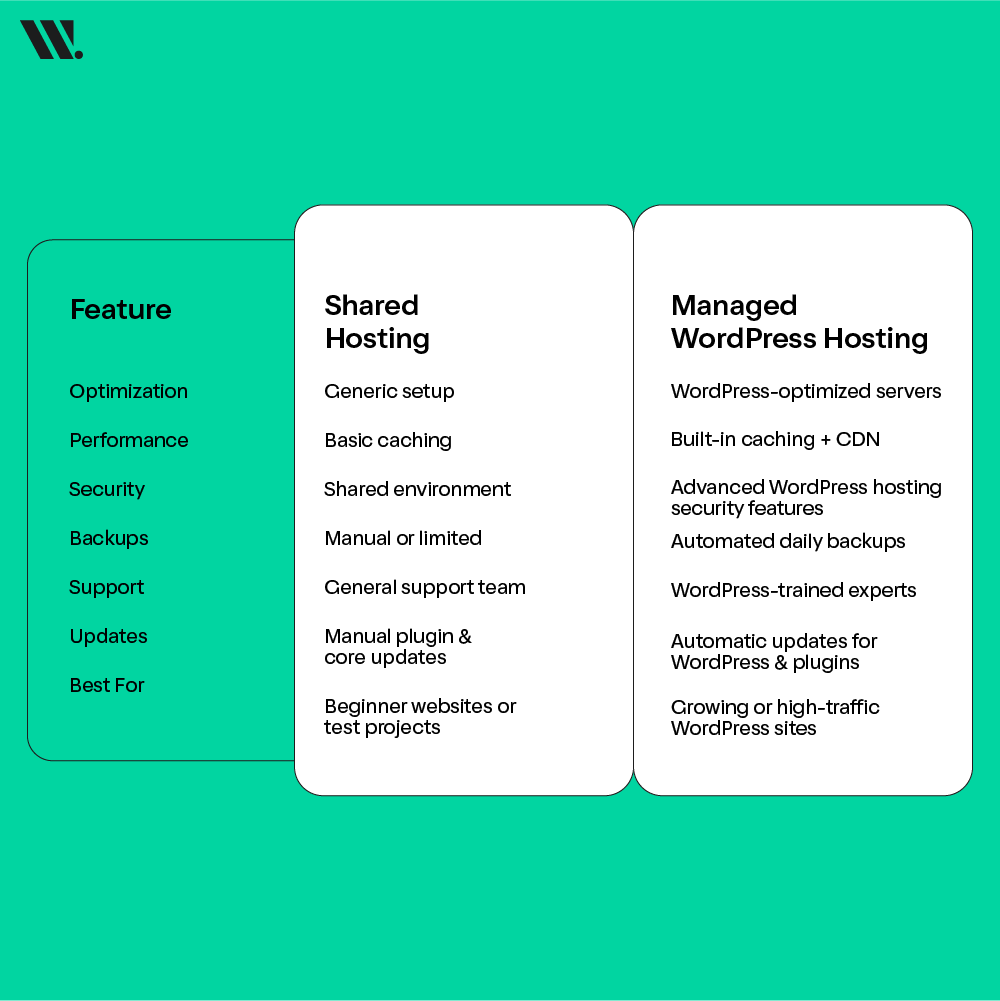
Feature | Shared Hosting | Managed WordPress Hosting |
|---|---|---|
Optimization | Generic setup | WordPress-optimized servers |
Performance | Basic caching | Built-in caching + CDN |
Security | Shared environment | Advanced WordPress hosting security features |
Backups | Manual or limited | Automated daily backups |
Support | General support team | WordPress-trained experts |
Updates | Manual plugin & core updates | Automatic updates for WordPress & plugins |
Best For | Beginner websites or test projects | Growing or high-traffic WordPress sites |
Common Misconceptions About Hosting
Some website owners are still relying on some of the misconceptions even in 2025, causing them to make bad hosting choices. Let’s clear them up.
“All Hosting Is the Same”
Not true.
The distinctions of shared and WordPress hosting are the optimization level the server offers, as well as performance tuning and support. Both types of hosting can host CMS WordPress, but the difference is that WordPress hosting is created for WordPress CMS and plugins.
“Shared Hosting Is Slow”
That’s not entirely accurate.
Shared hosting can be perfectly fine for low-traffic starter websites. The lag typically occurs when your site or others hosted on the same server become inundated with traffic.
For sites designed with WordPress plugins and themes, however, a server optimized for WordPress consistently delivers faster speeds.
“Only Professionals Know What WordPress Hosting Is”
Not anymore.
It's the best-recommended service for it." The good news is that today, hosting providers make beginner-friendly managed WordPress plans that come with one-click WordPress installer and your site will be on an SSL certificate in just a matter of seconds and round-the-clock full support at hand to help even users like me who are setting up their first website.
“You Can’t Host WordPress on Shared Hosting”
You can totally do it, but there are trade-offs.
Although shared hosting can support WordPress installation, it has no such special caching and security practices in place that render WordPress hosting distinct.
Use Cases: Which Type of Hosting is Appropriate?
So let’s take a look at the example situations below, and find out which user will have an advantage with shared or WordPress hosting.
Example 1: The Novice Blogger
A student creates a simple blog to share travel experiences. Scenario A: A student decides to publish his stories about traveling on the web.
Best Choice: Shared Hosting
Why? Shared hosting is very cheap, which makes it perfect for beginners.
Example 2: Small Business Owner
Scenario: A bakery is going to start an online ordering system, a website-only based on the WordPress CMS.
Best Choice: WordPress Hosting
Why? Faster load times, plugin compatibility and less downtime all add up to helping your customers.
Example 3: The Digital Shop
Example: An agency that has 15 client sites, each of which is built using WordPress.
Best Choice: Managed WordPress Hosting
Why: It will take a load off your shoulders by facilitating automated back-ups, version control and expert WordPress support to help you when problems arise.
Example 4: The E-Commerce Store
Use case: An expanding WooCommerce store with an increasing amount of traffic.
Best Choice: Managed WordPress Hosting
Why: Dedicated resources, caching and solid security mean that you can scale up at busy times confidently.
Key Takeaways
Factor | Shared Hosting | WordPress Hosting |
|---|---|---|
Ease of Use | Beginner-friendly with cPanel | Even simpler with pre-installed WordPress |
Performance | Dependent on shared resources | Consistently faster with WordPress optimization |
Security | Basic protection | Enhanced WordPress security |
Best For | Small personal or test sites | Professional, growing WordPress websites |
Cost | Lower upfront | Better long-term value |
If you’re just starting out: Begin with beginner shared hosting.
If you’re serious about growth: Switch to WordPress hosting for performance, automation and peace of mind.
Conclusion: Which Hosting to Choose in 2025?
The 2025 decision on which option to go for, Shared Hosting or WordPress Hosting, is based purely on your objectives.
If you’re just getting started with your first website and it’s subject to budget constraints, then shared hosting is a good launch point.
But if your priority is performance, scale and security, or you already use WordPress as your CMS, it’s no doubt that WordPress hosting (particularly managed hosting) is the way to go.
At the end of the day, every site owner should have the hosting that grows with their needs, and this is where WordPress hosting does better than traditional shared websites.
Get partnered with the best web hosting provider and see your brand grow with the right hosting type!